Tags:
tag this topic
create new tag
view all tags
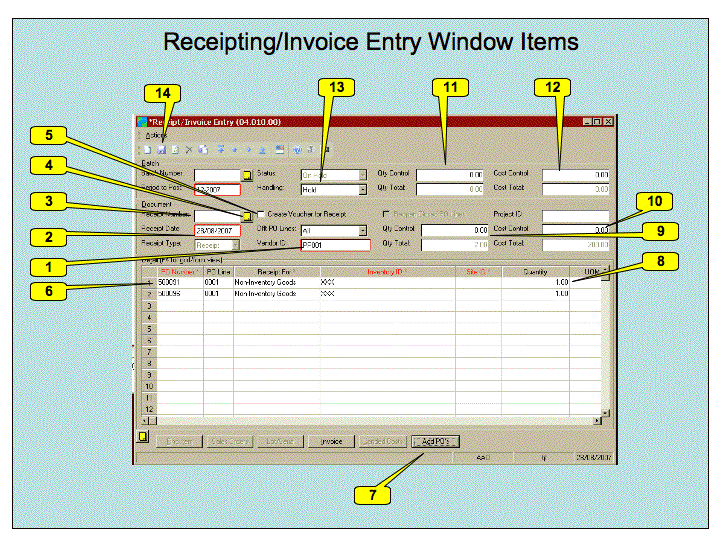
---++ Receipting Goods on delivery When goods you have ordered are delivered - you must inform the accounting system that they have been received, completed and in good order - so that the invoice can be paid. This work instruction tell you how to do this within Solomon. %TOC% ---++ Receipt/Invoice Entry Screen Receipting goods is done using the "Receipt/Invoice Entry" screen. Start up the *Microsoft Dynamics SL* screen and select the *Purchasing* module. Then invoke the *Receipt/Invoice Entry* application from the *Input* area (normally the top centre of screen). ---+++ Receipting concepts The basic concept behind the application is that you may have received a bunch of goods from different vendors. You may not know immediately which Purchase Orders (Requisitions) are involved. For each vendor, the application requires that you select the vendor ID. It will create a Receipt *Document* with a *Receipt Number* for that vendor. You can then work through each purchase order for that vendor. You can receipt all lines on the Purchase Order or do partial receipts. You must then confirm the quantity and cost. At this point you may save the receipt document and work on a receipt document for other vendors. Such a set of receipt documents makes up a "Batch". This is optional - you need have only one receipt document in a given batch (and is probably more suitable to large inwards goods departments). You can confirm the quantity and cost of goods for the batch and then release the batch. ---+++ Receipting Process ---++++ Summary Here is a summary of the process 1 Select the vendor. 1 Add complete Purchase Order or PO Lines 1 Confirm the Quantity received 1 Repeat the above two for each PO or PO Line 1 Confirm the total Quantity and Cost for the Receipt Document 1 Confirm the total Quantity and Cost for the Batch 1 Set the *Batch Handling* to *Release Now* 1 Save the batch - which causes the batch to be released. ---++++ Working through Receipting Screen The image below shows the receipting entry screen %ICON{arrowbright}% <img src="%ATTACHURLPATH%/Receipting.gif" alt="Receipting.gif" width='720' height='540' /> We will now work through this screen in the order in which you would normally do so. 1 The Vendor ID must be inserted here. Use F3 to bring up the vendor list and then select the vendor. You may find it useful to select the *Name* column and then type the first few characters of the vendor name and hit TAB. This should put you in the right area of the list. 1 The date the goods were received. Filled in automatically to todays date but you can change this if required. 1 The Receipt document number - filled in when you save the document. 1 Use this button to add notes to the receipt. (Maybe to record problems etc). 1 Leave the *Create Voucher for Receipt* box unchecked. 1 There will be a detail line for each line on the purchase order. You can use F3 to select the Purchase order and then F3 in the *PO Line* item to select the line. 1 Alternatively use the *Add PO's* button to add all lines from a specified purchase order 1 Confirm the right quantity has been received and the unit cost is correct. Other items can be ignored. 1 Confirm the total quantity from this supplier is correct. 1 Confirm the total price from this supplier is correct (Price before GST). 1 Confirm the total quantity for this batch is correct. 1 Confirm the total price for this batch is correct (Price before GST) 1 Set the handling to "Release Now" 1 Save and process the batch. You may be prompted for if you are processing just the receipt *Document* or the *Batch*. Select *Batch*. ---++ Page Security settings These settings make this page visible by all. * Set ALLOWTOPICVIEW = %MAINWEB%.AAOGeneralGroup, %MAINWEB%.TWikiAdminGroup, %MAINWEB%.TWikiGuest -- Main.TonyFarrell - 28 Aug 2007
Attachments
Attachments
Topic attachments
I
Attachment
History
Action
Size
Date
Who
Comment
gif
Receipting.gif
r1
manage
116.9 K
2007-08-28 - 05:26
TonyFarrell
Receipting Window
ppt
Receipting.ppt
r1
manage
118.0 K
2007-08-28 - 05:27
TonyFarrell
Receipting window power point source
E
dit
|
A
ttach
|
Watch
|
P
rint version
|
H
istory
: r1
|
B
acklinks
|
V
iew topic
|
Ra
w
edit
|
M
ore topic actions
Topic revision: r1 - 2007-08-28
-
TonyFarrell
Log In
or
Register
BusinessPractices Web
Create New Topic
Index
Search
Changes
Notifications
Statistics
Preferences
Webs
BusinessPractices
Main
TWiki
Home
Site map
BusinessPractices web
Main web
TWiki web
BusinessPractices Web
Create New Topic
Index
Search
Changes
Notifications
RSS Feed
Statistics
Preferences
P
View
Raw View
Print version
Find backlinks
History
More topic actions
Edit
Raw edit
Attach file or image
Edit topic preference settings
Set new parent
More topic actions
Account
Log In
Register User
E
dit
A
ttach
Copyright © 2008-2026 by the contributing authors. All material on this collaboration platform is the property of the contributing authors.
Ideas, requests, problems regarding TWiki?
Send feedback